Last Updated: 1 September 2026
Blueprint Step 2.4 – Stage 2: Get Online
Now comes the decision that makes most micro-business owners freeze: which website platform should I actually use?
This isn't a small choice. Pick wrong, and you'll face migration headaches, hidden costs, or a platform that can't grow with you. Pick right, and you'll have a foundation that serves your business for years.
The good news? You don't need to understand every technical detail. You just need to match your specific business needs to the right platform category. That's exactly what this guide does.
We're cutting through the noise of 50+ options to help you make one clear decision: the platform you'll build on. No more comparison paralysis. No more "maybe I should research one more option." Just a straightforward path from confusion to commitment.
By the end of this article, you'll have chosen your platform and created your trial account, ready to start building.
On this page:
- •Quick Start: Platform Decision in 15 Minutes
- •Complete Step-by-Step Guide
- •Troubleshooting
- •What's Next
Quick Start: Platform Decision in 15 Minutes
The 5-Step Quick Decision
Step 1: Define Your Core Requirement
Ask yourself one question: What is the PRIMARY thing my website must do?
- •Sell physical or digital products → You need e-commerce functionality
- •Generate leads for services → You need forms and information pages
- •Publish regular content → You need a content management system
Write down your answer. This single decision eliminates half your options immediately.
Step 2: Apply the E-commerce Filter
If you selected "Sell products":
- •Eliminate generic builders (Wix, Squarespace)
- •Focus on: Shopify (easiest) or WooCommerce (most flexible)
- •Skip to Step 5
If you selected "Services" or "Content":
- •Eliminate specialized e-commerce platforms (Shopify, BigCommerce)
- •Continue to Step 3
Step 3: Choose Your Management Style
For service and content sites, you have two paths:
Path A: All-in-One Simplicity (SaaS Builders)
- •Monthly subscription includes hosting, security, updates
- •Limited customization, but zero technical maintenance
- •Best for: "I want to build it and forget the technical stuff"
- •Options: Squarespace, Wix, Webflow
Path B: Maximum Control (Self-Hosted)
- •You manage (or pay for) separate hosting
- •Unlimited customization, but requires ongoing attention
- •Best for: "I want full control and lowest long-term cost"
- •Option: WordPress
Step 4: Apply Your Technical Confidence
Be honest about your comfort level:
Beginner (Never built a website):
- •Choose: Squarespace or Wix
- •You'll pay more monthly, but avoid technical overwhelm
Confident (Comfortable learning new tools):
- •Choose: WordPress
- •You'll invest time upfront, but gain flexibility and lower costs
Step 5: Sign Up for Your Trial
Don't overthink this. Choose your platform and create your account right now:
- •Squarespace: 14-day free trial (no credit card required)
- •Wix: Free plan available (upgrade when ready)
- •WordPress: Sign up for hosting (Bluehost, SiteGround, or similar)
- •Shopify: 14-day free trial
Save your login credentials in a secure location.
NetNav Integration Point: Not sure which features your website will actually need to perform well? Before committing, NetNav can run an audit on a comparable competitor site, helping you define the critical features (like speed, mobile UX, and security) you must demand from your platform choice.
Complete Step-by-Step Guide: Matching Platform to Purpose
This section walks you through the decision with full context, helping you understand why each choice matters for your specific business model.
Step 1: Define Your Functionality Threshold
The biggest mistake micro-business owners make is choosing a platform based on design templates rather than core functionality. Your platform must support what your business actually does.
Let's break down the three primary website functions:
Function 1: Lead Generation (Service Businesses)
Your website's job is to convince visitors to contact you. You need:
- •Contact forms that work reliably
- •Clear service descriptions
- •Testimonial displays
- •Appointment booking (optional)
Platform requirements: Basic content management, form integration, mobile responsiveness.
Function 2: E-commerce (Product Businesses)
Your website must handle transactions securely. You need:
- •Product catalogues with variants (sizes, colours)
- •Shopping cart and checkout
- •Payment processing
- •Inventory management
- •Shipping calculations
Platform requirements: Dedicated e-commerce features, payment gateway integration, security compliance.
Still deciding if you need a full website or could start with a marketplace? Read Website vs Marketplace: Where Should You Sell?
Function 3: Content Publishing (Blogs, Portfolios, Resources)
Your website regularly publishes new content. You need:
- •Easy content creation and editing
- •Category and tag organization
- •Search functionality
- •RSS feeds
- •Comment management (optional)
Platform requirements: Robust content management system, SEO tools, media library.
****
Action: Write down which function describes your primary need. If you need specific requirements for basic e-commerce, that becomes your non-negotiable filter.
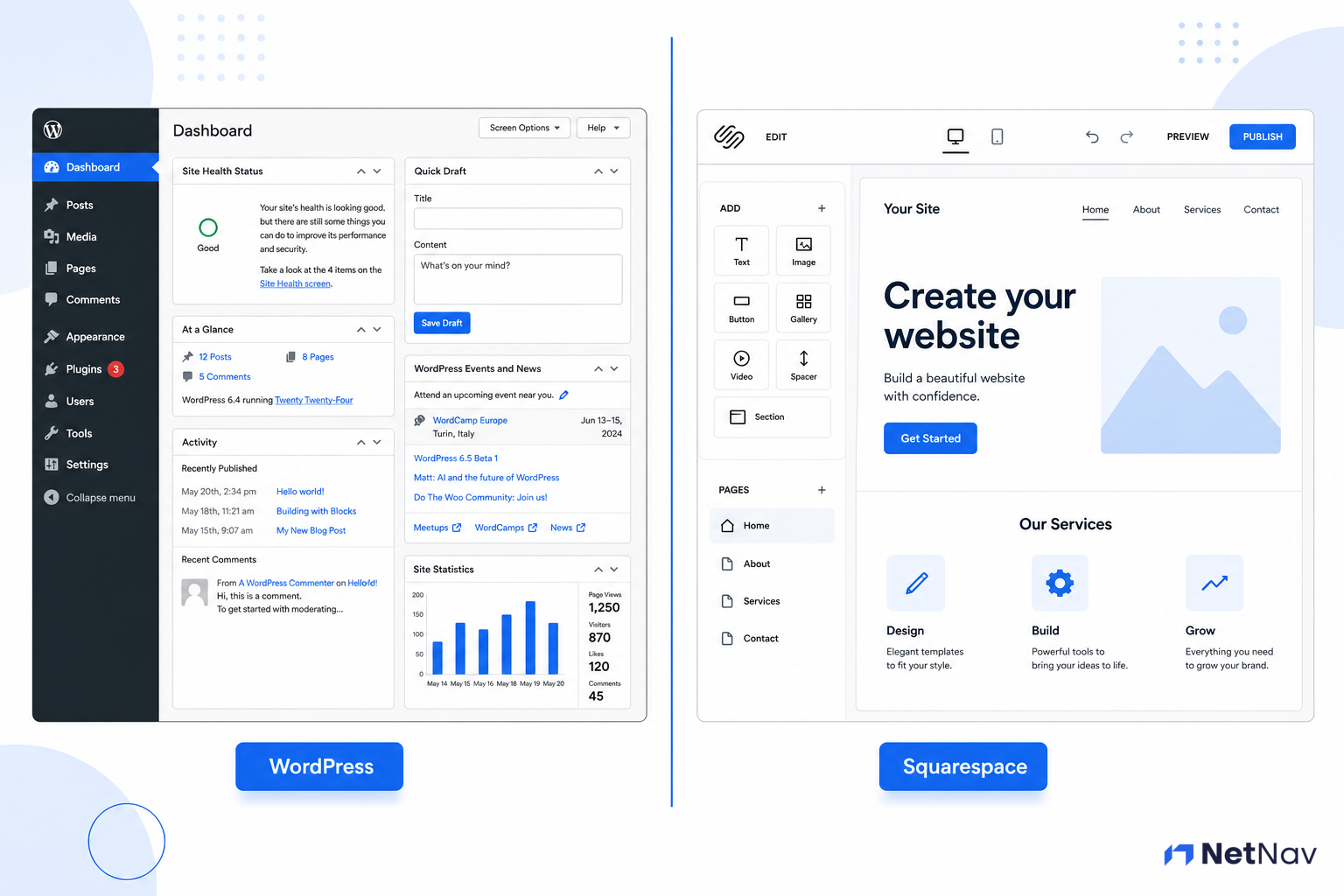
Step 2: SaaS Builder vs. Open Source Reality Check
Once you know your functionality requirement, you face the fundamental platform choice: all-in-one simplicity or maximum control?
Understanding SaaS Builders (Squarespace, Wix, Shopify)
"SaaS" means Software as a Service. You pay a monthly subscription, and the platform handles:
- •Web hosting (where your site files live)
- •Security certificates (HTTPS)
- •Software updates
- •Backup systems
- •Technical support
Advantages:
- •Zero technical maintenance
- •Predictable monthly costs
- •Built-in security
- •Beginner-friendly editors
Disadvantages:
- •Higher long-term costs (£10-£40/month forever)
- •Limited customization
- •Platform lock-in (harder to migrate)
- •Transaction fees (on some plans)
Understanding Open Source / Self-Hosted (WordPress)
WordPress is free software, but you need to arrange your own hosting. You're responsible for:
- •Choosing and paying a hosting provider
- •Installing security plugins
- •Running updates
- •Managing backups
- •Troubleshooting technical issues
Advantages:
- •Lowest long-term cost (hosting from £3-£10/month)
- •Unlimited customization
- •No transaction fees
- •Full data ownership
- •Massive plugin ecosystem
Disadvantages:
- •Steeper learning curve
- •Ongoing maintenance responsibility
- •Security is your responsibility
- •Need to understand cost of separate hosting
The Honest Truth: SaaS builders trade money for time. WordPress trades time for money. Neither is "better"—they serve different priorities.
Webflow sits between these two paths — hosted like a SaaS builder, but built for far more design control than Squarespace or Wix offer.
Action: Decide which resource you have more of: money (choose SaaS) or time (choose WordPress).
Where Do AI Website Builders Fit Into This Decision?
Every platform in this guide — Wix, Squarespace, Shopify, and WordPress (via tools like 10Web and Elementor AI) — now includes some form of AI-assisted setup: describe your business in a sentence or two, and the platform generates a rough first draft of your site. This isn't a separate category you need to research on top of everything above. It's a feature that comes bundled with the platform you were already choosing. Use it if it's offered — it removes the blank-page problem — but it doesn't change which platform is right for your business.
Separately, a newer wave of AI-first builders has emerged that don't fit into either path above — tools like Framer AI and Durable, which generate a working site from a written prompt in minutes, often with hosting, a domain, and basic marketing tools bundled in. These can be genuinely useful for getting something simple live fast: a one-page presence, a solo service business, a placeholder while you build something more permanent.
Here's the trade-off worth naming honestly: most of these tools are new companies, several only a year or two old, with pricing and features that are still changing month to month. Before you build your business's home online on one of them, check two things: can you export your content if the company shuts down or changes direction, and how long has it actually been operating? A platform with a decade of history (WordPress, Squarespace, Wix) carries less of that risk than one that launched last year, however impressive the demo looked.
If you're a confident non-technical founder who wants something live today and doesn't mind rebuilding later, an AI-first builder is a reasonable alternative to the four platforms below. If your website is meant to be a long-term business asset, stick with the established options in this guide and just use their built-in AI tools to speed up setup.
Step 3: Compare the Top 5 Contenders by Feature & Cost
Let's compare the platforms most micro-businesses choose, with current pricing and feature reality.
| Platform | Best For | Starting Cost | E-commerce | Customization | Learning Curve | Transaction Fees |
|---|---|---|---|---|---|---|
| Squarespace | Service businesses, portfolios | From ~£13/month | Add-on tier from ~£20/month | Medium | Easy | 0-3% depending on plan |
| Wix | Beginners, simple sites | Free (with ads) / from ~£13/month | Commerce plans from ~£21/month | Medium | Very Easy | 0% on business/commerce plans |
| WordPress | Content-heavy, full control | Free software + £3-10/month hosting | Via WooCommerce (free plugin) | Unlimited | Moderate | 0% (platform-level) |
| Webflow | Design-led brands, agencies | From ~£12/month | Commerce plans from ~£22/month | High (visual, code-level control without coding) | Moderate | Varies by plan |
| Shopify | Dedicated e-commerce | From ~£23/month | Excellent (built for this) | Medium | Easy | 0% with Shopify Payments, ~2% otherwise |
Detailed Breakdown:
Squarespace:
- •Strength: Beautiful templates, excellent for visual businesses (photographers, designers, consultants)
- •Weakness: E-commerce features lag behind dedicated platforms
- •Choose if: You prioritize design and simplicity over advanced features
Wix:
- •Strength: Absolute beginner-friendly, drag-and-drop everything
- •Weakness: Sites can be slower, less professional perception
- •Choose if: You need something running TODAY with zero learning curve
WordPress:
- •Strength: Still powers over 40% of all websites — more than every other platform in this list combined — though that share has been gently declining as more sites move to AI-generated and no-CMS platforms. It remains the most flexible option here by a wide margin, with a huge support community.
- •Weakness: Requires comfort with learning, ongoing maintenance
- •Choose if: You want full control and plan to grow significantly
- •Note: Often combined with WooCommerce for e-commerce
Webflow:
- •Strength: Visual, drag-and-drop design with far more control than Wix or Squarespace — closer to hand-coded flexibility without needing to code
- •Weakness: Steeper learning curve than the other SaaS builders; e-commerce features are less mature than Shopify's
- •Choose if: You want more design freedom than a typical builder offers, but don't want the ongoing maintenance responsibility of self-hosted WordPress
Shopify:
- •Strength: Built specifically for selling products, excellent checkout experience
- •Weakness: Expensive for non-e-commerce features, transaction fees add up
- •Choose if: E-commerce is your primary (or only) business model
NetNav Integration Point: While a builder might seem easier now, remember that security and speed are often compromised. NetNav runs continuous checks on your site's core health once launched, minimizing the technical maintenance burden of platforms like WordPress and ensuring your builder site remains fast.
Action: Based on your function (Step 1) and management preference (Step 2), eliminate platforms that don't fit. You should now have 1-2 finalists.
Step 4: Factor in Technical Confidence and Long-Term DIY Plan
Your final decision comes down to honest self-assessment: How much time will you realistically dedicate to your website?
The "Set and Forget" Reality Check
If you want to build your site and rarely touch it:
- •Choose: Squarespace or Wix
- •Accept: Higher monthly costs, limited growth options
- •Benefit: Zero maintenance stress
The "Active Manager" Reality Check
If you're comfortable learning and plan to regularly update content:
- •Choose: WordPress
- •Accept: Initial learning investment, ongoing responsibility
- •Benefit: Lower costs, unlimited potential
The "I'll Hire Help" Reality Check
If you plan to eventually hire a developer or designer:
- •Choose: WordPress (most developers prefer it)
- •Accept: Higher initial setup costs if hiring immediately
- •Benefit: Easier to find affordable help, better long-term value
**
**
The Template Reality
Regardless of platform, you'll likely start with a pre-made template. Understand the difference between working with pre-made themes or templates before you commit.
Action: Make your final decision based on your honest technical confidence and time availability. Write it down: "I am building on [PLATFORM]."
Step 5: Make the Commitment
Decision made? Excellent. Now make it real by creating your account before you close this page.
For Squarespace:
- Visit squarespace.com
- Click "Get Started"
- Choose "Website" (not online store, unless pure e-commerce)
- Select a template category (you can change this later)
- Create account with your professional email
- Start 14-day trial (no credit card required)
For Wix:
- Visit wix.com
- Click "Get Started"
- Choose "Create with AI" or "Start from Template"
- Answer the setup questions
- Create account with your professional email
- Start with free plan (upgrade when ready)
For WordPress:
- Choose a hosting provider (Bluehost, SiteGround, or Hostinger recommended for beginners)
- Select the basic shared hosting plan (£3-7/month)
- Register or connect your existing domain
- Complete the WordPress installation (usually one-click)
- Save your hosting login AND WordPress admin login separately
For Shopify:
- Visit shopify.co.uk
- Click "Start free trial"
- Enter your email and create password
- Answer the setup questions
- Start 14-day trial (no credit card required)
Critical: Save your login credentials in a secure location (password manager, encrypted document, or secure note). You'll need these constantly over the next few weeks.
Troubleshooting
What's Next
Immediate Next Step:
You've chosen your platform and created your account. Before you can plan your website, you need your domain and email in place.
→ Continue to: How to Buy Your Domain & Set Up Professional Business Email
In the next step, you'll define your essential pages, navigation, and user flow for your chosen platform. This planning prevents the "blank canvas paralysis" that stops most people from actually building.
Go Deeper
Want to explore related topics in more detail?
The Complete Small Business Website Audit Checklist (28-Point Guide)
If you want to know what a good website must get right, use this checklist before choosing.
Other Get Online Guides
- •Website vs Marketplace: Where Should You Sell?
- •What Should I Put on My Homepage?
- •Buy a Domain & Set Up a Professional Email
- •Mobile-First Design Explained Simply
Your Platform Is Chosen—Now Optimize It
You have selected your platform! This is a massive commitment made. Before you start building, run a quick NetNav audit on a comparable site. We identify over 50 technical issues that even the best platforms overlook, ensuring your build is optimized from Day 1.
Start Your Free NetNav Audit →
Part of the NetNav Academy Blueprint: Your step-by-step path from idea to sustainable micro-business.
Previous Step: Set 3 Simple Marketing Goals You Can Easily Track
Next Step: How to Buy Your Domain & Set Up Professional Business Email