Last updated: September 2026
You've optimized your Google Business Profile. You've uploaded photos, written your description, and verified your location. But here's the problem: Google doesn't just trust what you say about your business. It looks for external proof that you're real, established, and legitimate.
That proof comes from business directories—also called citations in local SEO circles. When Google sees your business name, address, and phone number (NAP) consistently listed across multiple trusted directories, it builds confidence that you're a genuine business serving real customers. This isn't about gaming the system; it's about establishing the digital footprint that local search algorithms expect to see.
The challenge? There are hundreds of directories out there, and most micro-businesses waste hours submitting to irrelevant platforms or, worse, creating inconsistent listings that actually harm their rankings. The solution is simpler than you think: focus on quality over quantity, prioritize the directories that actually matter, and maintain absolute consistency in your business details.
This guide will walk you through adding your business to the seven essential directories that deliver the most local SEO impact—and you can complete the entire process in about 60 minutes.
Jump to: Quick Start | Complete Guide | Troubleshooting
Quick Start (60 Minutes)
This streamlined approach gets your seven essential directory listings live today. If you need more context or run into issues, the Complete Guide below provides detailed explanations for each step.
Step 1: Prepare Your Exact NAP Details
Open a document and copy your business details exactly as they appear on your Google Business Profile. This includes:
- •Business name (including any Ltd, Limited, or & symbols)
- •Full address (including "Street" vs "St", "Suite" vs "Ste")
- •Phone number (including country code format)
- •Website URL
- •Primary business category
This document becomes your single source of truth. Every directory entry must match it character-for-character.
Step 2: Identify Your Top 7 Directories
For most UK micro-businesses, these seven directories deliver the strongest local SEO impact:
- Apple Business Connect (powers Apple Maps and Siri local search results)
- Bing Places for Business (Microsoft's search engine)
- Yelp (review authority and mobile search)
- Facebook Business Page (social proof and local discovery)
- Yell.com (UK-specific business directory)
- Thomson Local (established UK directory with strong domain authority)
- Foursquare (a growing data source for AI tools like ChatGPT when answering local business questions)
If you operate in a specific niche (restaurants, healthcare, trades), you may substitute one of these for an industry-specific directory. We'll cover that in the Complete Guide.
Step 3: Start All Seven Submissions Simultaneously
Open seven browser tabs and navigate to the business submission page for each directory. Starting them all at once prevents you from getting bogged down in one platform's verification process while losing momentum.
Most directories follow a similar pattern:
- Search to see if your business already exists
- Claim existing listing OR create new listing
- Fill in required fields
- Upload media assets
- Submit for verification
Step 4: Fill In All Required Fields
Using your NAP document, complete every required field on each platform. Pay special attention to:
- •Business name: Copy-paste exactly from your document
- •Address: Match formatting precisely (including postcode format)
- •Phone number: Use the same format across all platforms
- •Website URL: Include https:// if your document includes it
- •Category: Choose the category that most closely matches your Google Business Profile primary category
- •Description: You can customize this for each platform, but keep core facts consistent
- •Hours: Match your Google Business Profile hours exactly
Upload your logo and 2-3 key photos to each listing. Consistent visual branding across directories reinforces legitimacy.
Step 5: Complete Verification
Most directories verify ownership through:
- •Email verification: Click the link sent to your business email
- •Phone verification: Enter a code sent via SMS or automated call
- •Postcard verification: Wait 5-14 days for a postcard with verification code (rare for secondary directories)
Complete verification for all seven directories before considering this step done. Unverified listings often don't appear in search results or provide SEO benefit.
✅ Completed the quick version? You've built your foundational citation layer—the external proof Google needs to trust your business location and legitimacy. Move on to NAP Consistency to lock in your advantage, or continue below for the detailed walkthrough that covers category selection, niche directories, and advanced optimization.
Complete Step-by-Step Guide: Mastering Citations
This comprehensive walkthrough explains why each step matters and provides detailed guidance for businesses with complex situations (multiple locations, service areas, industry-specific needs).
Step 1: Master Your NAP
NAP consistency is the single most important factor in directory listings. Even minor variations—"Street" vs "St", "Ltd" vs "Limited", or different phone number formats—can confuse search engines and dilute your local SEO impact.
The essential concept of NAP consistency is simple: search engines treat each variation as potentially different businesses. If Google sees "Smith Plumbing Ltd" on one directory and "Smith Plumbing Limited" on another, it can't confidently connect those citations to your Google Business Profile.
Create your NAP master document:
- Open your verified Google Business Profile
- Copy your business name exactly as it appears (including punctuation, legal designations, spacing)
- Copy your address exactly as formatted (including abbreviations, suite numbers, postcode spacing)
- Copy your phone number in the exact format shown (including country code, spacing, parentheses)
- Save this document and use it as your single source of truth for every directory submission
Common NAP variations to avoid:
- •Inconsistent legal designations: "Ltd" vs "Limited" vs omitting entirely
- •Address abbreviations: "Street" vs "St", "Road" vs "Rd", "Suite" vs "Ste"
- •Phone formatting: "+44 20 1234 5678" vs "020 1234 5678" vs "(020) 1234-5678"
- •Building names: Including or omitting building names inconsistently
- •Postcode spacing: "SW1A 1AA" vs "SW1A1AA"
Choose one format and stick to it religiously. Your Google Business Profile format should be your standard.
Step 2: Prioritize the Power Players
Not all directories deliver equal value. Focus your initial effort on platforms that offer the strongest combination of domain authority, user traffic, and local search integration.
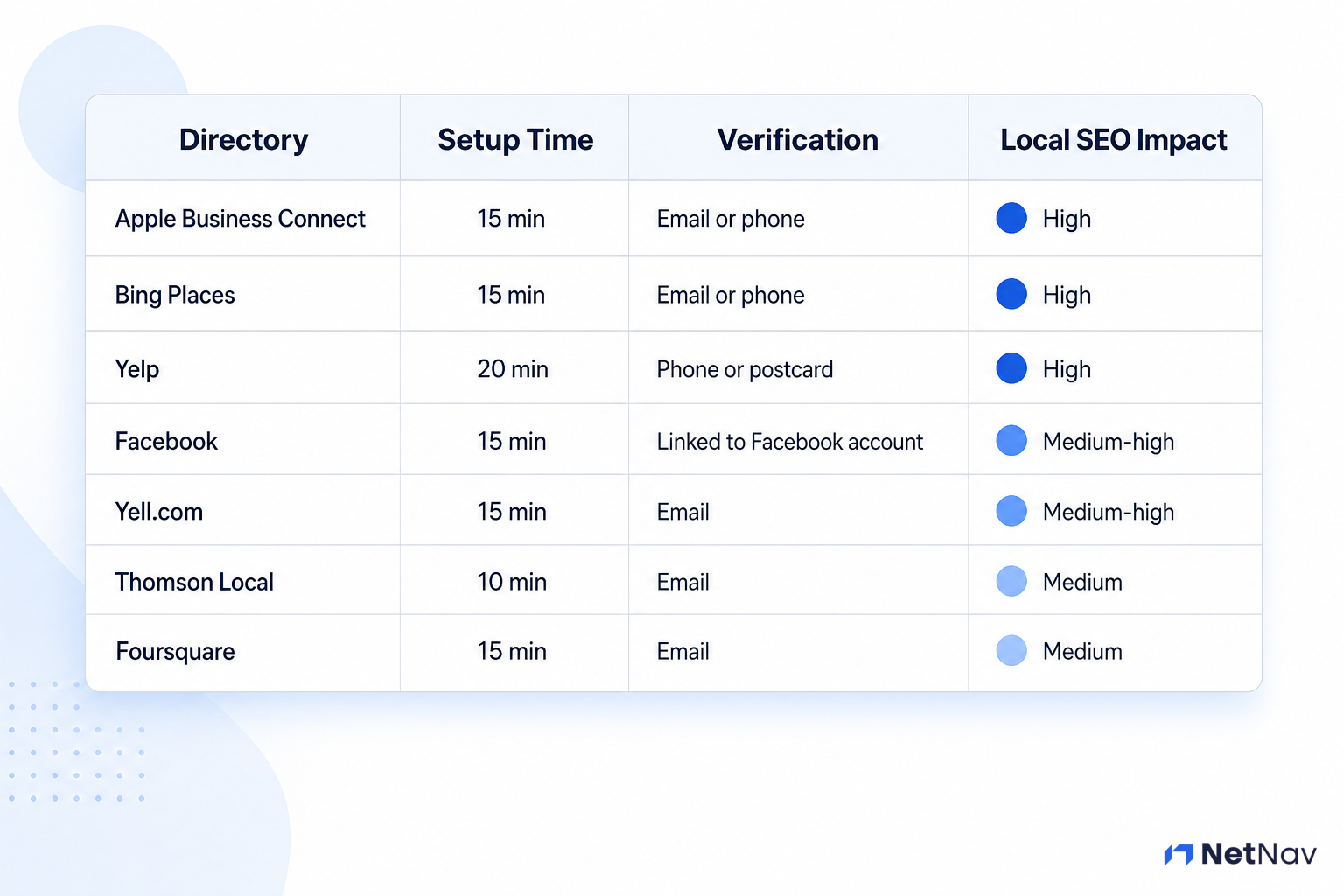
The top 7 directories for UK businesses:
1. Apple Business Connect
- •Why it matters: Powers Apple Maps and Siri-based local search results—a growing share of "near me" searches happen through Siri and Apple Maps rather than Google, and this is the only way to control how your business appears there
- •Local SEO impact: High—among the highest-authority citation sources for UK businesses, and the primary route into the Apple search ecosystem
- •Setup time: 15 minutes
- •Verification: Email or phone
2. Bing Places for Business
- •Why it matters: Bing powers 6-8% of UK searches and is the default search engine for many corporate networks
- •Local SEO impact: High—Bing has its own local search algorithm that relies heavily on citations
- •Setup time: 15 minutes
- •Verification: Email or phone
3. Yelp
- •Why it matters: Dominant review platform with strong mobile presence; Apple Maps uses Yelp data
- •Local SEO impact: High—Google may use Yelp reviews as a trust signal
- •Setup time: 20 minutes
- •Verification: Phone or postcard
4. Facebook Business Page
- •Why it matters: Massive user base, strong local discovery features, appears in Google search results
- •Local SEO impact: Medium-high—social signals and engagement matter
- •Setup time: 15 minutes
- •Verification: Linked to personal Facebook account
5. Yell.com
- •Why it matters: Established UK directory with strong domain authority and local search presence
- •Local SEO impact: Medium-high—particularly strong for trades and local services
- •Setup time: 15 minutes
- •Verification: Email
6. Thomson Local
- •Why it matters: Long-standing UK directory with good domain authority and local coverage
- •Local SEO impact: Medium—solid foundational citation
- •Setup time: 10 minutes
- •Verification: Email
7. Foursquare
- •Why it matters: A significant data source that AI tools like ChatGPT and Claude draw on when answering local business questions—less of a household name than Yelp or Facebook, but an increasingly important citation as AI-driven search grows
- •Local SEO impact: Medium, and rising—more about AI visibility than traditional Google ranking signals
- •Setup time: 15 minutes
- •Verification: Email
Industry-specific alternatives:
If you operate in certain sectors, consider replacing one of the general directories with a niche platform:
- •Restaurants/hospitality: TripAdvisor, OpenTable
- •Healthcare: NHS Choices, Doctify
- •Trades: Checkatrade, TrustATrader, MyBuilder
- •Professional services: Trustpilot, Bark
- •Retail: Google Shopping (requires Merchant Center setup)
The key principle: choose directories where your actual customers look for businesses like yours.
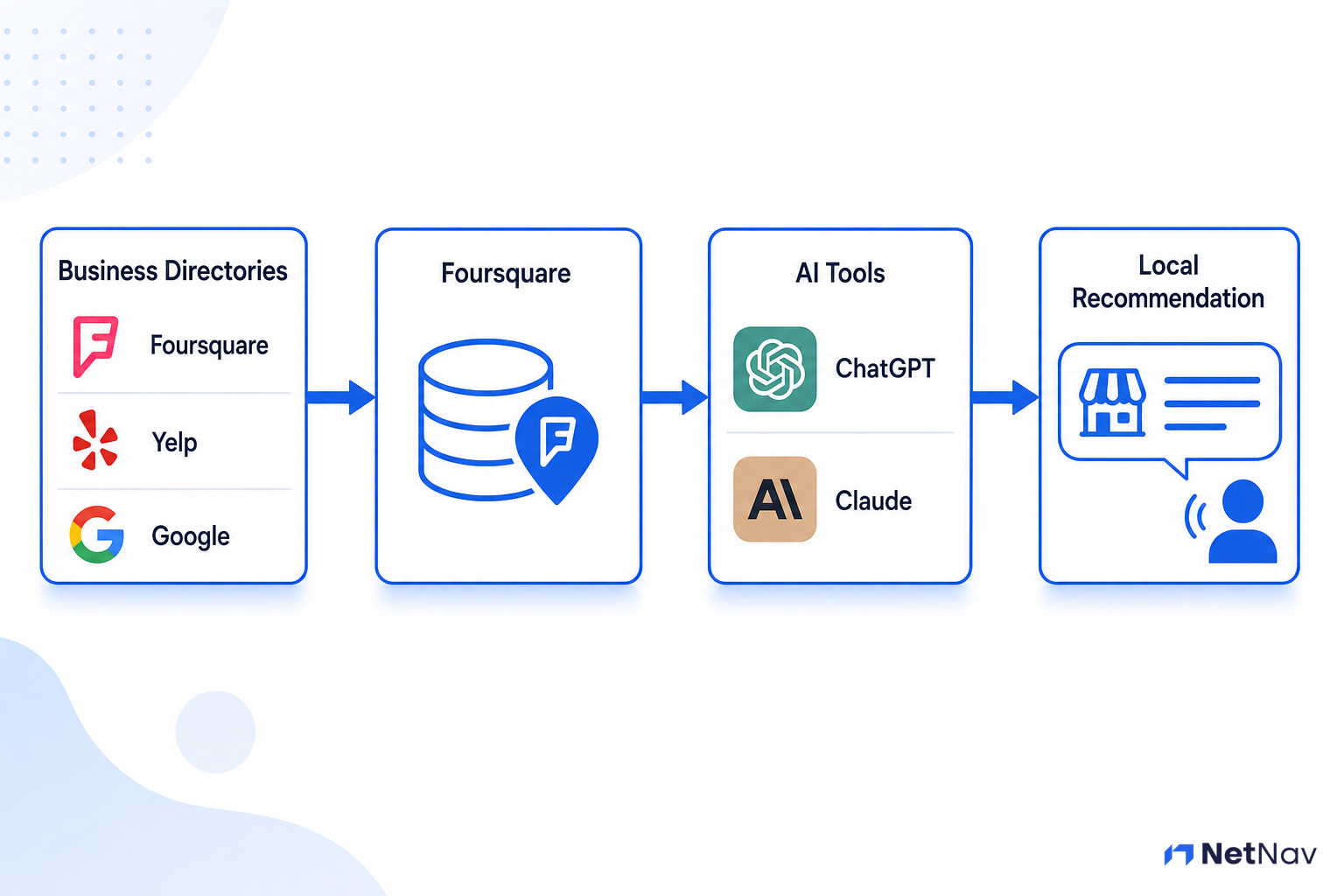
Do AI Search Tools Like ChatGPT Use These Directories Too?
Increasingly, yes. When someone asks ChatGPT, Claude, or a similar AI tool for a local business recommendation, that answer often draws on the same kind of directory data you're building here—not just Google's index. Foursquare in particular has been identified as a significant data source AI tools pull local business information from, which is why it's included in your top 7 above even though it's less of a household name than Yelp or Facebook.
The practical implication: the same NAP consistency that helps Google trust your business also helps AI tools describe you correctly when someone asks them for a recommendation. Getting your name, address, and phone number right across directories isn't just a Google SEO task anymore—it's how you show up correctly across every way people are starting to search.
Step 3: The Importance of Category Selection
Directory categories directly impact which searches your business appears in. Choose incorrectly, and you'll rank for irrelevant searches while missing your target customers.
Category selection rules:
- Match your Google Business Profile primary category: Your main directory category should align with your Google Business Profile primary category. This consistency reinforces your business focus to search engines.
- Be specific, not broad: Choose "Emergency Plumber" over "Plumber" if emergency service is your focus. Specific categories face less competition and attract more qualified leads.
- Limit secondary categories: Most directories allow multiple categories. Limit yourself to 2-3 that genuinely represent your core services. Too many categories dilute your focus and confuse search algorithms.
- Avoid aspirational categories: Only select categories for services you actively provide and want to rank for. If you're a plumber who occasionally does heating work, don't select "Heating Engineer" unless it's a genuine focus.
Category research process:
- Search your primary keyword + your city in Google (e.g., "plumber Manchester")
- Check the categories your top 3 competitors use on their Google Business Profiles
- Note which categories appear most frequently
- Choose the most specific category that accurately describes your primary service
Different directories use different category taxonomies. When your exact category isn't available, choose the closest match that maintains consistency with your Google Business Profile focus.
Not sure you've covered the prerequisites? NetNav's audit checks the fundamental structure and speed of your site, confirming you have a solid platform before you start building external links.
Step 4: Visual Assets and Branding
Directory listings with complete visual branding receive more clicks and appear more legitimate to both users and search algorithms. Every directory should include:
Essential visual assets:
- Logo: Upload your primary logo in the highest resolution accepted (usually 500x500px minimum). Use the exact logo from your brand style guide to maintain consistency.
- Cover/hero image: A high-quality photo showing your business, team, or work. This should be 1200x600px or larger and represent your business professionally.
- Additional photos: 2-3 photos showing your work, products, team, or premises. These build trust and give potential customers a sense of your business.
Photo optimization tips:
- •Use original photos, not stock images (search engines can detect stock photos)
- •Include people when possible—photos with faces receive more engagement
- •Show your actual work or products, not generic industry images
- •Ensure good lighting and professional composition
- •Compress images to load quickly without sacrificing quality
- •Name files descriptively: "smith-plumbing-team.jpg" not "IMG_1234.jpg"
Consistency matters: Use the same logo and similar photo styles across all directories. This visual consistency reinforces brand recognition and legitimacy.
Step 5: The Submission Process
With your NAP document and visual assets prepared, the actual submission process becomes straightforward. Most directories follow this pattern:
Standard submission workflow:
- Search for existing listing: Many directories already have partial listings for businesses (pulled from public databases or user submissions). Search your business name + postcode to check.
- Claim or create: If a listing exists, claim it. If not, create a new listing. Claiming is always preferable—it preserves any existing reviews or engagement.
- Complete required fields: Fill in every required field using your NAP document. Required fields typically include:
- Business name
- Address
- Phone number
- Website URL
- Primary category
- Business description
- Add optional fields: Complete as many optional fields as possible:
- Hours of operation
- Payment methods accepted
- Year established
- Number of employees
- Service area (for service-area businesses)
- Social media links
- Upload visual assets: Add your logo, cover image, and 2-3 additional photos.
- Review and submit: Double-check every field against your NAP document before submitting. One character difference can create consistency issues.
Time-saving tip: Open all seven directories in separate tabs and complete the same field across all platforms before moving to the next field. This assembly-line approach reduces errors and speeds up the process.
Step 6: Verification Process Walkthrough
Unverified listings provide minimal SEO benefit and often don't appear in search results. Verification proves you control the business and have authority to manage the listing.
Common verification methods:
Email verification (most common):
- Directory sends verification email to the address you provided
- Click the verification link within 48 hours
- Listing becomes active immediately
Phone verification:
- Directory calls your business phone or sends SMS
- Enter the verification code on the directory website
- Listing becomes active immediately
Postcard verification (rare for secondary directories):
- Directory mails postcard to your business address
- Wait 5-14 days for delivery
- Enter code from postcard on directory website
- Listing becomes active
Video verification (emerging method):
- Record short video showing your business premises
- Upload to directory platform
- Human reviewer confirms legitimacy
- Listing becomes active within 2-3 days
Verification troubleshooting:
- •Didn't receive email: Check spam folder, verify email address is correct, request new verification email
- •Phone number not recognized: Ensure you're using a local number (not mobile or VoIP if possible)
- •Postcard not delivered: Verify address is exactly correct, wait full 14 days before requesting new postcard
- •Can't verify service-area business: Some directories require physical premises; consider using your home office address if you operate from home
Manually checking dozens of directories for inconsistent NAP data is tedious and risky. This is one of the checks NetNav runs automatically across your whole site, spotting critical consistency errors instantly.
Step 7: Finding Niche Directories
After completing your seven foundational directories, consider adding 1-2 niche directories specific to your industry. These specialized platforms often deliver highly qualified leads because they attract users actively searching for your specific services.
How to find niche directories:
1. Google search method:
- •Search: "[your industry] directory UK"
- •Example: "plumber directory UK", "solicitor directory UK", "restaurant directory London"
- •Review the top 10 results, focusing on directories (not individual business websites)
- •Check domain authority using a free tool like Moz's Link Explorer
2. Competitor research method:
- •Identify your top 3 local competitors
- •Search their business name in Google
- •Note which directories they appear on
- •Prioritize directories where multiple competitors have listings
- •Learn more about systematic competitor research
3. Industry association method:
- •Check if your industry has a trade association or professional body
- •Most associations maintain member directories
- •These directories carry high trust signals for industry-specific searches
- •Examples: Federation of Master Builders, Law Society, Institute of Chartered Accountants
Evaluating niche directories:
Before investing time in a niche directory, verify:
- •Active user base: Check if listings have recent reviews or updates
- •Domain authority: Use Moz or Ahrefs to check domain authority (aim for 30+)
- •Google presence: Search the directory name—does it rank well in Google?
- •Free option available: Avoid paid-only directories for initial citation building
- •Allows your business type: Some directories restrict certain business categories
Niche directory examples by industry:
- •Trades: Checkatrade, TrustATrader, MyBuilder, Rated People
- •Healthcare: NHS Choices, Doctify, Private Health
- •Legal: Law Society, Solicitors Regulation Authority
- •Restaurants: TripAdvisor, OpenTable, Bookatable
- •Retail: Google Shopping, Trustpilot
- •Beauty: Treatwell, Wahanda
- •Automotive: AutoTrader, Motors.co.uk
Remember: quality trumps quantity. Seven perfectly consistent, verified listings on relevant directories deliver more SEO value than 50 inconsistent listings on random platforms.
🎉 All set? You've built a powerful foundation for local visibility—the external proof that establishes your business as legitimate and trustworthy in Google's eyes. You're ready to lock in your advantage with NAP Consistency, which ensures these citations continue working for you instead of against you.
Troubleshooting
Problem: NAP details don't match across platforms (discovered after submission). Why it happens: Copying errors, autocomplete suggestions, or using memory instead of your master document. Fix: Use your Google Business Profile entry as the single, centralized "master" source for all fields. If you've already submitted with inconsistent data: 1. Log back into each directory 2. Edit your listing to match your master NAP document exactly 3. Pay special attention to abbreviations, spacing, and punctuation 4. Save changes and re-verify if required 5. Document the correction date in your tracking spreadsheet Inconsistent citations actively harm your local SEO, so fixing them is worth the time investment. Checking your current citations regularly prevents this issue from recurring.
Problem: Feeling overwhelmed by the number of potential directories. Why it happens: Google searches for "business directories" return hundreds of options, creating analysis paralysis. Fix: Start with the top 7 national platforms first (Apple Business Connect, Bing, Yelp, Facebook, Yell, Thomson Local, Foursquare). Complete these before researching niche options. Then, search Google for "[Your Industry] + directory" to identify the next 2 niche targets. Example: "electrician directory UK" or "restaurant directory Manchester". Focus on directories where you can verify your competitors already have listings—if they're investing time there, it's likely worthwhile. Remember: 7 perfect listings beat 50 inconsistent ones.
What's Next
You've established your foundational citation layer—the external proof Google needs to trust your business location and legitimacy. But there's a critical vulnerability that can undermine all this work: inconsistent NAP data.
Even minor variations in how your business name, address, or phone number appear across different platforms can confuse search engines and dilute your local SEO impact. A single character difference—"Ltd" vs "Limited", "Street" vs "St"—can prevent Google from confidently connecting your citations to your Google Business Profile.
Next step: NAP Consistency: Why Your Business Details Must Match Everywhere
This guide shows you how to audit your existing online presence, identify inconsistencies, and systematically correct them. You'll learn the exact NAP format to use everywhere, how to handle edge cases (multiple locations, service areas, home-based businesses), and how to maintain consistency as your business evolves.
Go Deeper
Ready to expand beyond foundational directory work? These in-depth guides cover advanced local SEO strategies:
- •How Do I Rank My Local Business in Google? — For a comprehensive strategy on using directories and other factors (reviews, content, backlinks) to improve local search visibility and outrank competitors.
- •Competitor Research: What Are Others Doing Online? — Learn how to analyze which directories your top competitors are using (a key step often missed), what categories they've selected, and how to identify gaps in their strategy you can exploit.
Other Get Found Guides
Continue building your local search presence with these related guides from the Get Found stage:
- •Keyword Research for Very Busy Businesses — Discover what your customers actually search for (in 30 minutes or less) so you can optimize your directory descriptions and website content for the right terms.
- •Optimize Your Website for Google in 1 Hour — Quick technical fixes that improve how Google reads and ranks your website, complementing your directory work.
- •Should You Blog? (Honest Answer) — Decide whether content marketing makes sense for your business model and customer base, or if your time is better spent elsewhere.
- •How Do I Get Found by Local Customers? — The complete overview of local discovery strategies, from directories to Google Maps to social media.
- •Set Up Google Search Console — Connect your website to Google's free diagnostic tool to monitor how your directory citations and website content perform in search results.
Let NetNav Handle the Monitoring
You've completed key foundational citation building—manually creating and verifying listings across seven essential directories. But here's the challenge: NAP consistency isn't a one-time task. Business details change, directories update their platforms, and errors creep in over time.
Manually checking dozens of directories for inconsistent NAP data is tedious and error-prone. You'd need to visit each platform individually, compare details character-by-character, and track changes in a spreadsheet.
NetNav can audit your entire site across 9 pillars in 60 seconds—including checking the foundational Local SEO health of your existing listings. It spots critical consistency errors instantly, alerts you to missing information, and identifies opportunities to strengthen your local presence.
You've done the hard work of building your citation foundation. Let NetNav help you maintain it.